

Top 10 CNC Milling Machines: A Comprehensive Buying Guide
2026-07-21
Choosing the right CNC milling machine can feel overwhelming with so many options on the market. Whether you're a seasoned machinist or just setting up your first shop, the perfect balance of precision, durability, and value is essential. In this guide, we cut through the noise to bring you the top 10 machines that stand out in real-world performance—not just spec sheets. From compact benchtop models to industrial workhorses, we’ve tested and compared them so you don't have to. And if rugged reliability is what you’re after, keep an eye out for how WINNRUI CNC redefines tough. Let’s dive into the details that will help you make a confident investment.
What Really Separates Pro CNC Mills from Hobbyist Ones?
The first thing you notice when moving from a hobbyist mill to a professional machine is the sheer mass of the thing. A typical benchtop mill might weigh 200 pounds; a proper VMC starts at several tons. That weight isn't just for bragging rights—it's vibration damping and structural rigidity that directly affect surface finish and tool life. In a lightweight frame, chatter can creep in even during moderate cuts, forcing you to back off speeds and feeds. A heavy casting, often stress-relieved and hand-scraped for alignment, keeps the tool engaged correctly under load, letting you push carbide hard enough to make chips come off with that satisfying hiss instead of a chattering squeal.
Beyond the frame, the spindle is where the real divergence happens. Hobby spindles max out around 10,000 RPM with a few horsepower and usually use an R8 or ER collet system, which limits tool holding precision and repeatability. Professional spindles are often cartridge-type units with air-oil lubrication, capable of 15,000–30,000 RPM and tightening a BT or HSK toolholder into a dual-contact taper with micron-level runout. This lets you run smaller endmills at their ideal surface speed without deflection, and the automatic tool changer—rarely found on hobby machines—removes the minutes of manual swapping that add up over a complex part. The difference is not just speed but a fundamental shift in what's possible: interpolating a bore to tenths or 3D surfacing a mold cavity without witness marks.
The control system and servos also separate the two worlds. A hobbyist mill typically runs stepper motors with an open-loop controller, and if you push too hard and lose steps, you might not catch it until the part is scrapped. Professional machines use closed-loop servo drives with glass scales on the axes, constantly correcting position. That feedback loop, combined with a motion control board that handles look-ahead and jerk limiting, means contouring at high feed rates stays accurate. Then there's the thermal management: professional mills often have chilled coolant circulating through the head and ballscrews, keeping everything at a stable temperature so your part dimensions don't drift between morning and afternoon. Hobby setups just hope the garage stays cool.
Spindle Speed and Torque: The Numbers That Actually Impact Your Cuts
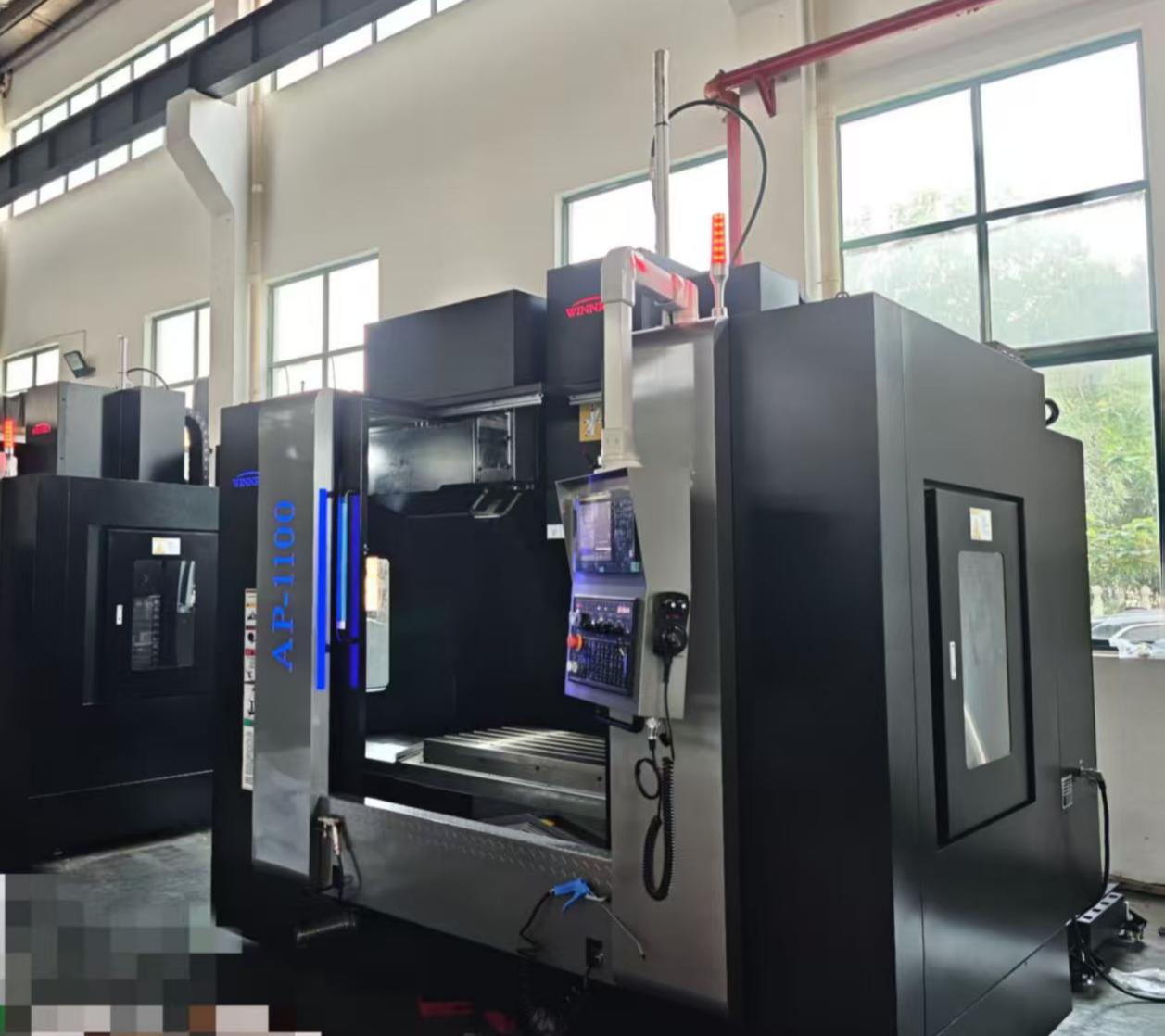
Spindle speed and torque aren’t just numbers on a spec sheet—they directly shape how your tool engages the material. Get the RPM wrong, and you’re either burning up bits from excessive heat or fighting chatter from a sluggish cut. A higher speed often pairs with lower torque, while dialing down the RPM can deliver the twisting force needed for dense hardwoods or aluminum. The trick is finding that sweet spot where the motor still has reserve power without straining, so you’re not leaving a rough finish behind.
Torque drops off as speed climbs in most spindles because the available horsepower gets spread thin. That means a router claiming “30,000 RPM” might struggle to maintain cutting force under load if the torque curve falls off a cliff. Quality spindles maintain a flatter torque band, giving you consistent chip load even when feed rates vary. If you’ve ever noticed your bit screaming through plywood but bogging down halfway through a piece of maple, you already know what inadequate torque feels like—the motor’s just not backing up the speed.
Pairing these numbers with your bit diameter matters more than the absolute values. A ½-inch bit needs far more torque to keep rotating than a ¼-inch one at the same RPM, so a spindle that handles small bits effortlessly might falter with larger tooling. Ignore the marketing hype about top speed and look instead at the usable RPM range where torque stays healthy. That’s where your cuts stay clean, tools last longer, and you quit second-guessing the machine’s limits mid-job.
The Real Price Tag: Budgeting for More Than Just the Machine
When you first spot a machine with a tempting sticker price, it’s easy to think the decision ends there. But the upfront cost is rarely the whole picture. Once you factor in shipping fees, import duties, and the inevitable accessories that don’t come in the box, that “good deal” can swell by 20–30% before you’ve even turned it on. Then there’s the space it will occupy – do you need to reinforce a floor, add ventilation, or reorganize an entire room just to accommodate it? These physical and logistical expenses quietly stack up, turning a straightforward purchase into a project with a much heftier bill.
Beyond the initial setup, the ongoing costs often catch new owners off guard. Consumables like specialty lubricants, replacement parts, and even electricity consumption can outpace expectations, especially if the machine runs hotter or longer than anticipated. Maintenance isn’t just about fixing breakdowns; routine calibration, software updates, and training for anyone who’ll operate it add layers of expense that aren’t always advertised. For businesses, downtime during repairs means lost productivity, a cost that rarely appears on a balance sheet until it’s too late.
Finally, consider the lifecycle and disposal. A machine might serve you well for years, but eventually it will need to be upgraded, sold, or scrapped. Resale value plummets if the model becomes obsolete quickly, and environmentally responsible disposal can come with its own fees. Leasing or subscription models might smooth out some of these bumps, but they introduce commitments that still affect long-term budgets. The real price tag is a moving target – one that demands you look past the showroom floor and into the months and years of ownership ahead.
Matching Your Mill to Your Materials: A No-Nonsense Guide
The heart of efficient milling lies in pairing the right machine with the material you're working with. Too often, shops force a mismatch—running a lightweight mill on dense alloys or using excessive horsepower for delicate plastics—leading to poor finishes, tool wear, or outright failure. Start by understanding your material's hardness, abrasiveness, and thermal properties. For softer metals like aluminum, a high-speed mill with proper chip evacuation works wonders, while titanium or hardened steels demand a rigid setup with low-speed torque and flood coolant. Ignoring these basics turns even a premium mill into a costly paperweight.
Beyond just metal grades, consider the geometry and coating of your cutting tools alongside the mill's capabilities. Abrasive composites, for instance, chew through uncoated carbide quickly, so opt for diamond-like coatings and a machine that maintains consistent feed without vibration. Plastics and wood are a different beast entirely: they require sharp edges and controlled chip removal to avoid melting or tearing. A spindle that can dial down to the right RPM without sacrificing accuracy is non-negotiable. It's not about owning the most advanced mill—it's about knowing where your material pushes back and choosing the setup that pushes forward without drama.
Lastly, don't let your ego override common sense. A benchtop mill with a 1HP motor isn't meant to hog out Inconel, and a half-million-dollar VMC is overkill for wax patterns. Match the work envelope, damping, and power curve to the job at hand. If you're frequently switching materials, invest in quick-change tooling and modular workholding, but never forget that the foundation is a mill sized and tuned for the worst-case material in your queue. Get this right, and you'll spend more time making chips than troubleshooting chatter or replacing busted end mills.
Work Envelope: Why Size Isn’t the Only Thing That Counts
When evaluating a robot’s work envelope, the immediate instinct is to compare sheer numbers—how far can it stretch, how many cubic meters can it cover. But fixating on volume alone can be misleading. A massive envelope that looks impressive on a spec sheet may contain dead zones or awkward angles that make real-world tasks frustratingly inefficient. True utility lies in how that space is structured, not just how much of it exists.
The shape of the envelope often matters more than the overall reach. A robot with a perfectly spherical workspace might struggle to access corners near its base, while a more compact design with a well-optimized kidney-shaped profile could handle tight assembly work without repositioning. Joint limits and mechanical singularities turn large portions of an envelope into no-go areas, effectively shrinking the usable workspace. Even the orientation of the end effector plays a role—some points might be reachable physically, but the required wrist twist makes the approach impractical.
Beyond geometry, the dynamics within the envelope can’t be ignored. At full extension, payload capacity and precision often degrade, meaning the outer edges of that impressive bubble might be too weak or too slow for your cycle time. The sweet spot where speed, accuracy, and force align is usually much smaller. So instead of asking how big the envelope is, it’s better to ask how much of it actually works for the job at hand—because a smartly sculpted compact space almost always outperforms a hollow giant.
Controller and Software: The Unsung Heroes of Precision
Behind every flawless 3D print lies a silent partnership between the controller board and its software. While the hardware grabs attention with its visible mechanics, it's the firmware interpreting G-code in real-time that orchestrates the delicate dance of stepper motors, extruders, and heaters. Modern controllers leverage advanced algorithms for jerk and acceleration planning, transforming a stream of coordinates into fluid motion that prevents artifacts like ringing or layer shifts. Without this computational backbone, even the most rigid frame would produce disappointing results.
What truly sets exceptional systems apart is how the software adapts to physical imperfections. Closed-loop controllers with sensor feedback can detect missed steps and compensate mid-print, while intelligent thermal management prevents oozing or under-extrusion by dynamically adjusting temperatures based on print speed and filament type. The latest advancements in input shaping and pressure advance counteract vibrations and nozzle pressure variations before they become visible on the final object, achieving a level of detail that rivals injection molding—all through real-time calculations invisible to the user.
The ecosystem extends beyond the printer itself, with slicers working hand-in-hand with controller firmware to optimize tool paths. From variable layer heights that enhance curved surfaces to support structures that peel away cleanly, the software makes thousands of micro-decisions per second. Open-source communities continuously refine these digital brains, ensuring that even budget machines can punch above their weight. Ultimately, the synergy between controller and software determines whether a design becomes a masterpiece or a messy spool of wasted filament.
FAQ
For beginners, the Tormach PCNC 440 is often recommended due to its user-friendly design and educational resources. It’s compact enough for a home shop and comes with PathPilot, an intuitive control software that simplifies learning. Plus, it doesn’t require a three-phase power supply, making it easier to set up in a typical garage.
A solid entry-level CNC mill like the Sherline packages can start around $1,500, while more capable machines like the Tormach PCNC 440 are in the $5,000 to $7,000 range. If you need production-grade performance, expect to spend upwards of $20,000 for something like a Haas Mini Mill. Keep in mind that tooling, workholding, and software can add a couple thousand dollars to your initial budget.
A 3-axis machine moves the cutting tool along the X, Y, and Z linear axes, which is fine for most standard parts. A 5-axis machine adds two rotational axes, allowing the tool or the part to tilt and rotate. This lets you machine complex geometries in a single setup, minimizing repositioning errors. The trade-off is a much higher cost and more complex programming.
Yes, many CNC mills can handle both, but you need to adjust speeds, feeds, and tooling accordingly. Aluminum and brass cut easily on lighter machines, but steel demands a more rigid setup. For wood, you’ll want dust collection and sharper tool geometry. Machines like the Laguna Swift series are purpose-built for wood, while the Tormach 770 is versatile enough for mixed materials in a hobbyist or prototyping environment.
Rigidity is key—look for cast iron frames and heavy bases to dampen vibration. Linear guides or box ways affect precision and load capacity. Spindle power and speed range determine what materials you can cut. Also consider the control system: conversational programming (like Haas’ intuitive system) saves time, while full G-code capability gives flexibility. Don’t overlook after-sales support and the availability of replacement parts.
Regular cleaning to remove chips and coolant residue is essential. Lubricate the ways, ball screws, and bearings according to the manufacturer’s schedule—skipping this leads to premature wear. Check spindle runout periodically and tram the head to ensure accurate cuts. Keep the coolant concentration right to prevent bacterial growth and corrosion. A weekly check of electrical connections and cable strain reliefs goes a long way.
It depends on your tolerance for tinkering. A used industrial machine like a Haas VF-2 can offer tremendous value if you’re able to inspect its ball screws, spindle hours, and overall wear. You might get it for half the price of new. However, you’ll likely need to handle repairs and lack a warranty. New machines come with support, training options, and the latest controller technology, which can save you headaches if you’re running a business.
Many people underestimate the importance of total cost. They focus on the machine price and forget about fixturing, cutting tools, software, and training. Another mistake is buying too much machine or too little—you don’t need a 5-axis mill for simple brackets, but a flimsy router-style machine won’t cut stainless steel accurately. Also, skipping research on local support and user communities leaves you stranded when something goes wrong.
Conclusion
Selecting a CNC milling machine goes far beyond horsepower ratings or table size—it’s about understanding how a machine’s design aligns with your actual work. Pro-grade mills separate themselves from hobbyist models not just through beefier frames and higher price tags, but in vibration damping, thermal stability, and the ability to hold tolerances hour after hour. Spindle performance is a perfect example: chasing raw RPM without considering torque curves is a common mistake. Low-end torque matters far more for steel than peak speed, and a spindle that bogs down ruins surface finish faster than dull tooling. Then there’s the cost trap—budgeting only for the machine itself overlooks tooling, workholding, coolant systems, and often a phase converter, which can easily add 30–50% to your outlay.
Equally critical is the match between the mill and your materials. A machine that excels in aluminum might chatter hopelessly in stainless, so look beyond motor power to rigidity and spindle bearing layout. The work envelope demands similar scrutiny: X/Y/Z travels mean little if you can’t access the part or if the enclosure limits fixture size. And none of that precision translates into parts without a controller that thinks like a machinist—smooth motion, look-ahead, and straightforward probing routines separate great control software from constant workarounds. Ultimately, the best CNC mill for you is the one that integrates these elements into your workflow without forcing you to fight its limitations on every setup.
Contact Us
Contact Person: Tim
Email: [email protected]
Tel/WhatsApp: +86 15522553731
Website: https://www.winnrui-cnc.com/